Well, the article name may sound a but cryptic but if you ever had a problem with the project name or you have been confused by strange brackets in the model browser, you are reading the right article.
Lets start with some screenshot:
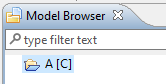
The project is named A but another label "C" is shown in brackets. This extra decoration is shown if the internal eclipse project name differs from the medini project name. That may happen in some cases, wanted or unwanted. If you open the Navigator view, you will see this:

While there is no problem with this case at all, I still would like to point you to a weird eclipse behavior that makes this thing a little bit more tricky. I attached a sample project named A.mprx which - if you import the MPRX - will exactly lead to the behavior introduced above.
If I now extract the ZIP to the file system, I also could import it with the "File --> Import Existing project into Workspace". Now expand the MPRX somewhere in the file system, e.g. in a temporary folder and import from there. Same result. Now lets extract the ZIP but extract it directly into the workspace and import it the same way. You will end up in:
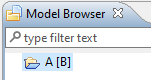
I will try to explain this phenomenon:
- Importing a project from MPRX or an arbitrary location outside the workspace will make eclipse look into a file named .project
- Inside the name of the internal eclipse project is encoded (which may differ from the medini project name)
- In my case, I named this C
- In case the project folder resides inside the workspace the eclipse load mechanism somehow behaves a bit different: it takes the folder name instead of checking the .project file, in my case I prepared the project archive in a way that the folder is named B to illustrate this discrepancy
So ultimately it depends on the way your project is named of course but also - that's the takeaway - how you import it into medini / eclipse
Happy doing
Jan